Whether you’re running a small business, a nonprofit organization, or anything in between, we know you want your website to really reflect your brand, your mission, and your vision.
There’s a great big world of customizable Yola Styles to help you do just that. Seeking a look that’s cutting edge, contemporary, playful, traditional, professional, or simple? You’ll find what you want in the range of Yola Styles. If you have a Yola Silver membership, you’ll get even more options.
Yola Styles are just the starting point for your creativity. Once you choose your Yola Style, you can revamp, refashion, and add your own touches for a totally unique site that will really make you stand out.
So, What’s A Yola Style?
Let’s break it down. Each Yola Style is a basic framework made up of:
- A fixed template – the navigational elements of your page. This structure stays put.
- A customizable design style – the look of your page: graphic elements, colors, motifs, and text boxes in the content area. Here’s where you can go wild.
Customize Your Design Style
Keep your design style simple—or customize it with the freedom to add content, images, and widgets to help you build your business.
The content area is your playground, so go for it. It’s easy to:
- Add photos and graphics.
- Expand and move columns and text boxes.
- Include headlines to elevate your messages, your offerings, or your testimonials.
- Create an image gallery for all those terrific product photos you’ve got in the works.
- Change up the colors any way you want.
Tweak Your Fixed Style
You can even customize some of the fixed style elements. Change up the banner with an image, your favorite color, a new design motif. Edit the menu on your navigation bar to reflect your needs. The only thing you can’t alter is where those elements live. The banner and navigation bar stay where they are.
Check Out Yola Style Examples
We’re in awe of how Yola members have remodeled our flexible Yola Styles to suit their own style. These aren’t designers—they’re folks just like you.
One of our basic Yola Style templates:

Here’s how a few Yola members custom-tailored the style above to suit their own website needs:
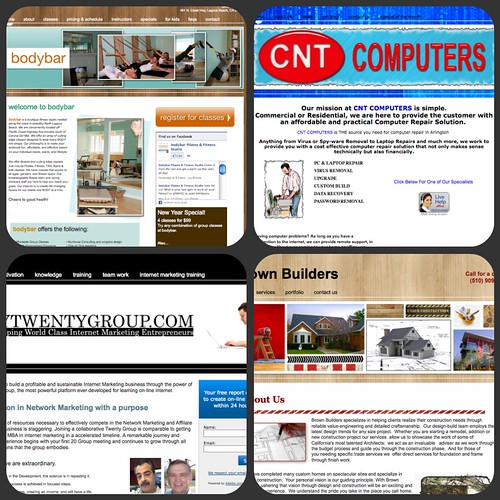
The possibilities are practically endless! So take a look, and get inspired. Then let your creativity lead the way, make your unique website, and tell your story to the world.
I am still with u guys. It’s just that i want to create apps to put on it.
i made my site whit yola!
I am finding some difficulty in moving text or pictures boxes the way I want… as I do not like to stick to some of the margins you have setup. Is there any way I can change the space between the boxes? sometimes they are too much apart for me, but may be I am just learning ;-))
Thank you so much for your assistance.
I am enjoying building my website with you!
Hi Dina,
Have you tried the Column Divider widget? If that doesn’t help please email support@yola.com and we can take a look at your site and see how we can help you further.
I would like to have a website for my none profit religious site
yola is great
Can you put an e-book here for sale?
@Nanna Yes, we do have a suggestion for members who want to offer digital downloads for sale, such as e-books.
I know Yola has so much to offer. That’s why I say Yola is truly WYSIWYG, that is — What You Search Is What Yola Gives !!
Thanks Chetan!
Pingback: Meet the Yola Web Stars Winners! | Yola
Pingback: Website of the Week: Seth’s Kitchen | Yola